MeetBanner is a virtual camera app that overlays QR-coded ad cards and image banners on your own video in Zoom® and Google Meet™. Sales calls, webinars, interviews — show what matters while you talk.
It works as a virtual camera — just switch cameras in Zoom®, Google Meet™, or your usual meeting app. Nothing to install on the other side.
Enter a title, description, and URL to auto-generate a card with a QR code. Viewers scan it with their phone and land right on your page.
Place logos, campaign images, or promo videos anywhere on your video. Drag with grid snapping keeps layouts perfectly aligned.
Fade between multiple cards and banners at your chosen interval. Switch what's shown to match the conversation — one click from the menu bar.
On-device AI detects you and blurs or replaces only the background. Your video never leaves your Mac.
Adjust brightness, contrast, and color temperature in one tap. Look your best even in a dim room.
Optimized for Apple silicon, holding full HD at 30 fps. Light on your Mac, even in long meetings.
Drag cards and banners into place while watching the live preview. Toggling and layout tweaks all happen on this one screen.
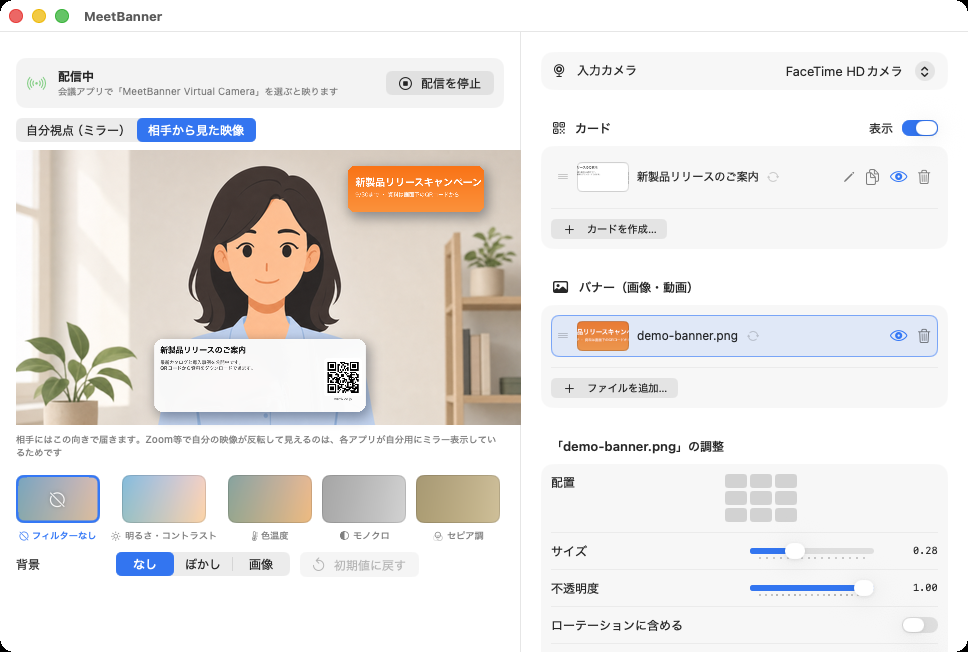
Enter a title, description, URL, and a photo — a QR-coded card is generated on the spot. No design work needed.
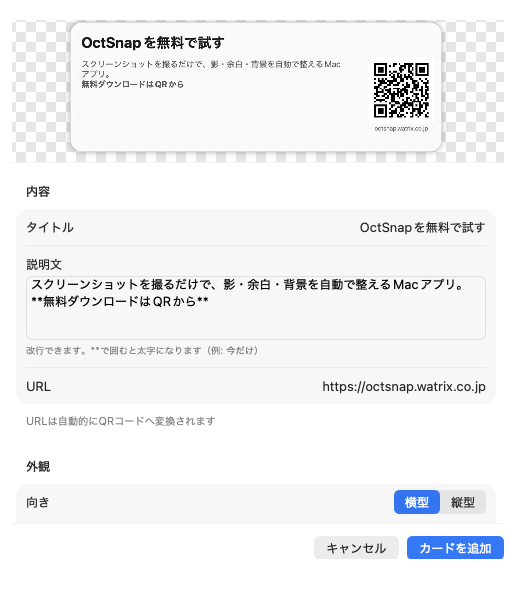
Type the title and description. Wrap text in ** for bold; line breaks are kept as is.
Pick a logo or product photo, and the URL is automatically turned into a QR code.
Hit “Add card”, then drag it anywhere on the preview. Choose small, medium, or large, horizontal or vertical.

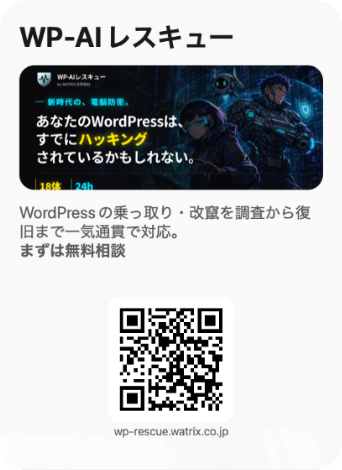
Create a card or add image and video files. Position them by dragging on the live preview.
In Zoom® or Google Meet™ camera settings, just pick “MeetBanner Virtual Camera”.
Then talk as usual. Show, hide, and switch banners instantly from the menu bar.
Show a QR to your deck or case studies mid-pitch. No more “can you send that later?”
Rotate sign-up QRs and next-event teasers. Put a call to action on screen before people drop off.
Keep your company intro and job-post QR on screen while the candidate is most engaged.
Show QRs to manuals and FAQ pages. Deliver hard-to-dictate URLs reliably.
$29.99 / year — Save 2 months with the yearly plan
Offered as a Mac App Store subscription
Payment and cancellation are managed through your Apple ID subscriptions. Cancel at least 24 hours before the trial ends and you won't be charged.
No. MeetBanner runs as a virtual camera on your Mac, so others simply see it as your normal camera feed.
Zoom®, Google Meet™ (Chrome), FaceTime, and any meeting app that supports macOS virtual cameras. Just choose “MeetBanner Virtual Camera” in the camera settings.
Macs running macOS 14 or later. It performs best on Apple silicon.
No. Banner compositing and AI background processing all happen on your Mac. Your video and images are never sent to our servers.
After the 14-day trial, the $2.99/month subscription begins. Cancel during the trial and you pay nothing. You can cancel anytime from your Apple ID subscription settings.
Yes. Show, hide, and advance to the next card in one click from the menu bar, or let auto-rotation fade between them at your chosen interval.
Setup takes about a minute. Try it free for 14 days.
 MeetBanner